Query Parameters
Query Parameters
DBeagle supports named $parameters so you can keep reusable SQL templates and supply values right before execution.
Parameter syntax
Use $name placeholders in SQL:
SELECT * FROM users WHERE status = $active;SELECT * FROM orders WHERE date BETWEEN $start_date AND $end_date;SELECT * FROM products WHERE category_id = $category_id;Supported value types
| Type | Example value | What DBeagle does |
|---|---|---|
| string | ready | Wraps and escapes it as a SQL string literal |
| number | 42 | Inserts it as a numeric literal |
| boolean | TRUE | Inserts TRUE or FALSE |
| null | NULL | Injects a SQL NULL |
| rawSql | current_date - interval '7' day | Injects the text exactly as entered |
How the Parameters view works
When DBeagle sees parameters in the active file or selection:
- The
Parametersview lists each placeholder. - You choose a value type for each one.
- You enter the raw value.
- DBeagle validates the inputs before letting the query run.
The view tracks the current scope:
File scopewhen you are running the whole fileSelection scopewhen you are running only the selected SQL
Validation behavior
If any required parameter is missing or invalid, DBeagle blocks execution and focuses the Parameters view so you can fix it.
Examples
Strings and numbers
select *from userswhere status = $status and user_id = $user_id;Set:
$statusasstring$user_idasnumber
Booleans
select *from feature_flagswhere enabled = $enabled;Set $enabled as boolean and choose TRUE or FALSE.
Raw SQL
select *from orderswhere order_date >= $start_expr;Set $start_expr as rawSql only when you intentionally want to inject SQL syntax rather than a quoted literal.
Use rawSql carefully. It is powerful, but it bypasses automatic quoting.
Persistence
DBeagle remembers parameter values per document or scratch where possible, so recurring queries are easier to rerun.
Resetting parameters
Use Reset Visible Query Parameters from the Parameters view action bar when you want to clear the current parameter set.
Layout tip
If you prefer the Parameters view on the right side of VS Code, move it into the Secondary Sidebar.
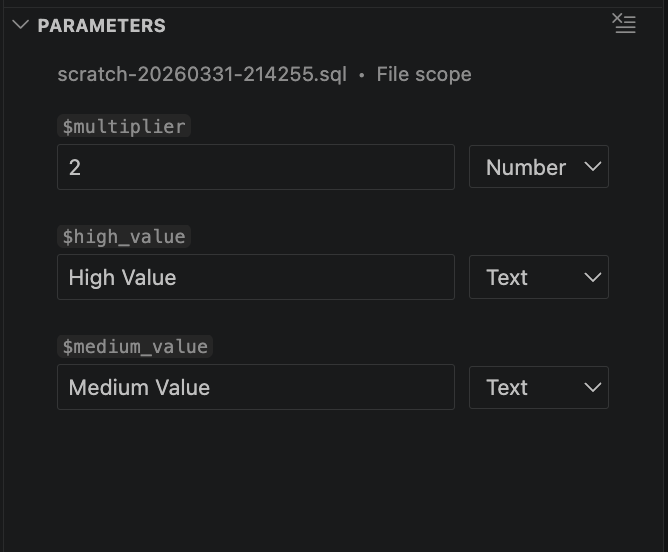
The Parameters view with typed query parameter inputs.