Introduction
DBeagle at a glance
DBeagle is a VS Code extension for SQL exploration. It keeps connection management, query execution, result browsing, charting, and lightweight SQL tooling inside the editor so you can move between code, investigation, and analysis without jumping to a separate desktop client.
The current release supports:
- Trino
- PostgreSQL
- MySQL
- Microsoft SQL Server
- Vertica
Product position
DBeagle is opinionated in a few useful ways:
- It is built for exploration first, not as a full DBA suite.
- It is safe by default, with read-only protection enabled when you first install it.
- It still gives you an escape hatch: you can turn write mode on when you intentionally need it.
- It is designed around the VS Code workflow, not around recreating a heavy standalone database client.
That means the sweet spot is day-to-day querying, debugging data issues, validating warehouse logic, and quickly inspecting production-safe datasets from the same place you already work.
What you can do today
- Add, test, save, duplicate, and switch connections
- Browse catalogs, schemas, tables, views, and columns from the Connections tree
- Preview tables directly from the tree
- Run SQL from an editor or selection with
Cmd/Ctrl+Enter - Use named
$parametersfor reusable queries - Keep reusable SQL in scratch files outside your repo
- Search, filter, sort, page, copy, and export result sets
- Switch result sets into chart view and export PNGs
- Navigate SQL with autocomplete and Query Outline
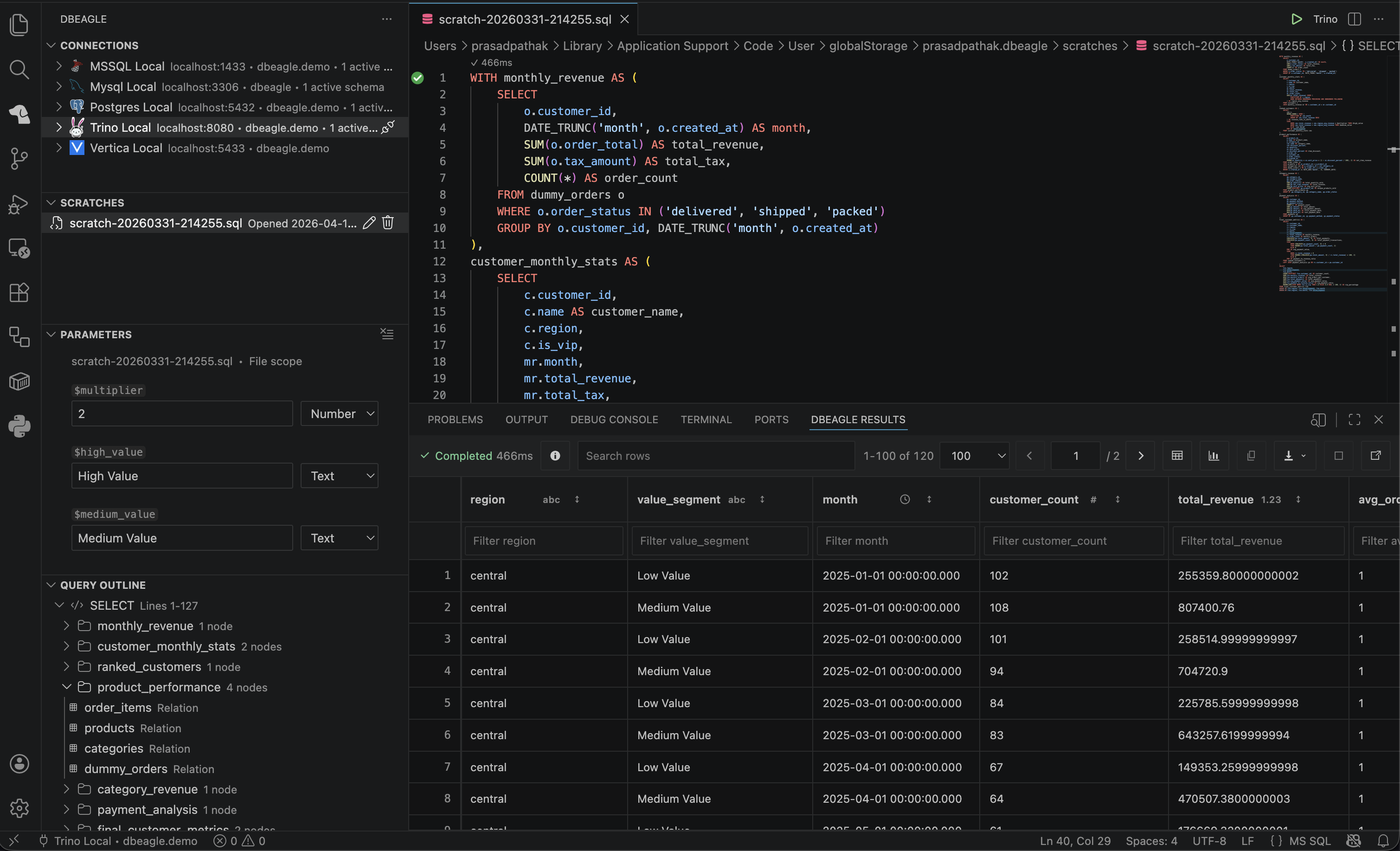
Full DBeagle workspace with connections, editor, results, and side panels visible.
Why it feels fast
DBeagle uses a hybrid architecture so the UI stays responsive even when result sets are large:
VS Code Extension Host (TypeScript)  -> connection management and secrets  -> query orchestration  -> result session lifecycle  -> webview coordination
Native Addon (Rust via napi-rs)  -> result ingestion  -> paging, sorting, filtering, counting  -> chart shaping  -> CSV / JSON export
SQL Parser (Rust -> WASM)  -> statement splitting  -> read-only validation  -> completion context  -> outline support
What DBeagle is not
DBeagle is intentionally not trying to be:
- A database administration suite
- A BI dashboard
- A migration or deployment tool
- A replacement for engine-specific admin consoles
Those boundaries are part of the product, not missing pieces. They help keep the experience focused and reliable.